Track My Biryani
Production-grade full-stack expense tracker built with Next.js App Router, TypeScript, MongoDB, React Query, GSAP, and Cloudinary.
Features
- JWT cookie auth with protected routes via middleware
- Expense/category management with analytics dashboard
- Dark/light theme with persisted preference (
next-themes) - Locale-aware currency/timezone preference detection
- Cloudinary image upload with client-side compression
- Data export (JSON format)
- PWA installable with service worker
Setup
- Install dependencies
npm install
- Configure env
cp .env.example .env.local
- Start dev server
npm run dev
Search API Tests
Plain-Node scripts (no test framework, no new dependencies) that exercise the search endpoints against a running dev server. They assert real values — ordering, date bounds, membership isolation — not just HTTP 200.
# 1. start the dev server (in another terminal)
npm run dev

# 2. seed idempotent test data (safe to re-run; wipes prior test data first)
node --env-file=.env scripts/seed-test-data.mjs

# 3. run a single suite
node scripts/test-expenses-search.mjs
node scripts/test-categories-search.mjs
node scripts/test-buckets-search.mjs

# 4. or run everything
node scripts/test-all.mjs
Set TEST_BASE_URL (default http://localhost:3000) if the server listens elsewhere.
The seed creates three test users (testuser_alice, testuser_bob, testuser_carol,
password testpass123), each with a personal bucket, plus shared buckets
Test Trip and Test Office, with categories and expenses spanning every date
preset, owner, notes/location combination. Existing account bharatbhusal is made
an accepted member of Test Trip. Test data is namespaced and wiped on each run.
Seed-created ids are written to scripts/.test-data.json so the suites reference
known records. Suites cover: defaults, every preset, custom ranges, sorting (both
directions), pagination, empty results, invalid-input handling, and cross-bucket
membership isolation (a user never sees a bucket they are not an accepted member of).
Environment Variables
DATABASE_URL: MongoDB connection URI (primary)JWT_SECRET: JWT signing secretCLOUDINARY_CLOUD_NAME: Cloudinary cloud nameCLOUDINARY_API_KEY: Cloudinary API keyCLOUDINARY_API_SECRET: Cloudinary API secretCLOUDINARY_FOLDER_NAME: Cloudinary folder for imagesNEXT_PUBLIC_API_URL: Client API base URL (default/api)
Scripts
npm run dev- development servernpm run lint- lint checksnpm run build- production buildnpm run start- run production server
Architecture
src/app: routes + API handlerssrc/features: feature UI modulessrc/components: reusable UI/layout/providerssrc/lib: shared utilities, env config, API layer, cloudinarysrc/hooks: app hooks and React Query hookssrc/models,src/repositories,src/services,src/controllers: backend layeringsrc/types: centralized domain types
API Overview
Main APIs:
- Auth:
/api/auth/* - Expenses:
/api/expenses - Categories:
/api/categories - Analytics:
/api/dashboard - Upload Signature:
/api/uploads/signature - Export:
/api/export
Detailed docs: docs/API.md
Deployment Guide
- Set all environment variables in hosting platform.
- Ensure MongoDB network access allows deployment environment.
- Build and start:
npm run build
npm run start
- Configure Cloudinary credentials and folder.
Troubleshooting
- Invalid environment configuration: verify
.env.localagainst.env.example. - Auth redirect loops: clear auth cookie and login again.
- Upload failures: verify Cloudinary credentials/folder and file constraints.
- Build issues: run
npm run lintthennpm run buildlocally.
Additional Documentation
docs/HLD.mddocs/ARCHITECTURE.mddocs/API.mddocs/UX.mddocs/TECH_STACK.mddocs/DATABASE_SCHEMA.mddocs/SCREENSHOTS.md
Screenshots
Track My Biryani — Landing
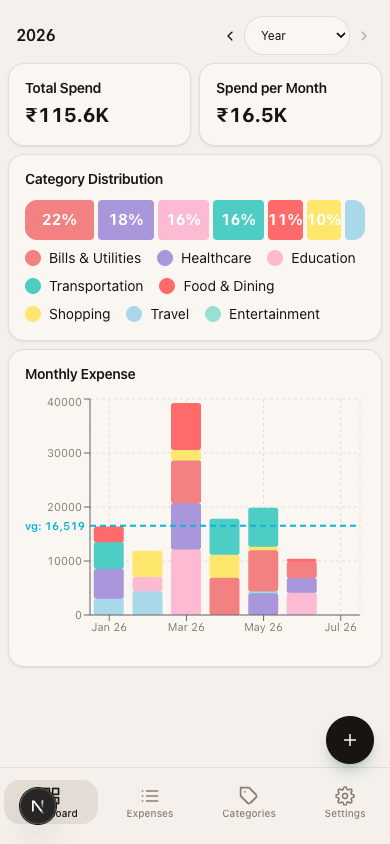
A full mobile UI walkthrough with every page and in-page interactions
(chart tooltips, category filtering, date-range switching) is in
docs/SCREENSHOTS.md.